Inner Circle / V1September 2026
Inner Circle app iconInner Circle V1

I built and tested an
iPhone birthday app.

Inner Circle saves birthdays, schedules reminders and updates linked Calendar events. I took the first version through device testing, a storage safeguard and a verified TestFlight update.

My roleProduct scope, decisions & acceptance testing
Built withRork Max · Swift · SwiftUI
ReleasePrivate TestFlight beta · 1.0.0 (4)
01 / The problem

V1 helps users save birthdays and receive reminders.

Inner Circle started with a personal need: remember and act on the birthdays of people who matter to me. The wider idea is relationship maintenance. For V1, I reduced it to one complete workflow: add a person, save their birthday, see what’s coming up, and receive a reminder.

I added one-way Calendar sync so a saved birthday could also appear in the calendar already used on the phone. Social imports, cloud accounts and AI-generated suggestions stayed outside this release.

Included in V1

  • Add, edit and view birthdays
  • Local storage and reminder settings
  • Optional photos and profile fields
  • Yearly events in a chosen calendar
  • Real-iPhone testing and TestFlight updates

Reserved for later

  • Facebook birthday retrieval
  • Cloud accounts and synchronization
  • Relationship intelligence
  • AI-generated outreach ideas
  • A public App Store launch

My contribution

I defined the scope and acceptance criteria, made product and architecture decisions with AI assistance, tested the app on my iPhone, and coordinated the release. Rork generated and implemented the native code and reported its build and unit-test results. This was a personal project, not a paid client deployment.
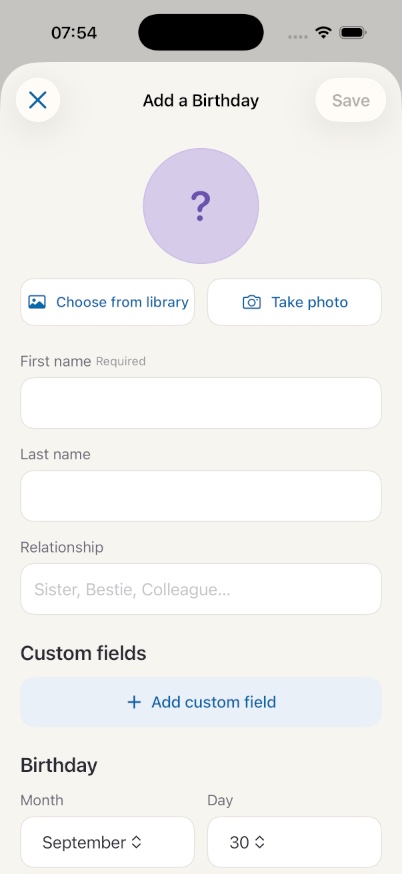
Product screenshot

The birthday form captures the person and their date.

Actual Inner Circle Add a Birthday screen with a required first name, optional surname and relationship, photo controls, custom fields, and month and day selectors.
Actual Rork iPhone simulator capture · September 30, 2026. This blank form contains no personal contacts.

A required first name keeps records identifiable.

Surname, relationship, photo and custom fields are optional, keeping the entry flow useful without requiring a complete contact profile.

A month and day define the birthday.

The form provides separate month and day controls. The screenshot documents the interface; the release and Calendar tests below provide the behavioral evidence.

02 / The system

Birthdays stay on the iPhone and sync to Calendar.

The app keeps the person record locally. Notifications and Calendar events are separate outputs. That distinction became important when the app’s birthdays disappeared after a direct installation while Calendar events remained.

User actionSave a person
01

Person record

Documents/people.json
Birthday, reminders and Calendar event ID. Photos live in separate local files.

02

Local reminders

Scheduled from the saved record and the user’s chosen reminder settings.

03

Calendar event

An annual, all-day event in the selected calendar, linked by its event identifier.

Inner Circle updates Calendar. Changes made in Calendar do not rewrite the person record.

This kept V1 focused and avoided an account system. It also left an explicit limitation: local storage alone is not an independent backup or a cross-device recovery system.

03 / Experiments

I tested installation, Calendar sync and data retention.

Four tests guided the release. Each records the problem, the change and the observed result.

01
Device workflow

I restored access to an app that stopped opening.

Observation. After a break in development, the installed app showed “Inner Circle is no longer available.” The app still opened in Rork’s simulator.

Action. Re-established the device installation and developer trust path, then tested the standalone app on the iPhone.

Result. The app opened and the core birthday workflow worked. Expired development signing was a plausible explanation; the original profile was not inspected, so it was not a proven root cause.

02
Integration

Birthday edits updated the linked Calendar event.

Question. Could a birthday change in Inner Circle update its Calendar event without requiring a separate export action?

Decision. Use one-way synchronization and save the Calendar event identifier with the person. Calendar changes should never delete or modify the person record.

Result. On the iPhone, editing a saved birthday updated both the app and the linked Calendar event. The full permission, offline and recurrence edge-case matrix was not independently verified.

03
Failure handling

Failed storage reads now block further changes.

Observation. A Rork Companion installation left the app empty, while old Calendar events remained. Inspection found that a missing file and a read failure could both appear as an empty list.

Change. Rork implemented three load outcomes: loaded, missing and failed. A failed read blocks mutations, preserves the original file, attempts a separate recovery copy and offers a retry action.

Result. Rork reported eight passing unit tests. That supports the read-failure safeguard; it does not establish why the earlier installation lost access to the records.

What the safeguards covered

Mutation guards run before photo deletion and Calendar/notification side effects. This prevents an unavailable store from appearing to save changes or clearing reminders from an empty list.

The reported tests covered valid and legacy records, a genuinely missing file, malformed storage remaining unchanged, recovery-copy contents and retry behavior. These were Rork’s reported tests, not a separate test run performed for this case study.

A recovery copy inside the same app container cannot survive removal of that entire container. An independent backup remains future work.

04
Release validation

Saved birthdays survived the TestFlight update.

Question. Would saved birthdays survive an in-place TestFlight update?

Test. Saved two dummy birthdays in the existing TestFlight installation, then updated to version 1.0.0, build 4, without deleting the app.

Result. Both birthdays remained. The app opened and Calendar sync worked. This verified one update through the intended distribution path, while leaving the earlier Companion installation issue unresolved.

04 / Product decisions

I kept V1 focused on a testable birthday workflow.

Manual entry before social import

Prove the core experience before introducing uncertain data access. This made V1 useful and testable even while Facebook retrieval remained an open question.

One-way Calendar sync

Keep the app authoritative and prevent a deleted or edited Calendar event from unexpectedly changing the contact data. This also kept conflict handling out of the first release.

A focused safeguard before a backend

Address the confirmed read-failure weakness instead of adding cloud storage as a speculative fix. Account-based storage belongs in V2, with its own access-control and recovery design.

Move to TestFlight with a bounded test

Use disposable data and a clear update test to assess the actual distribution path. Keep the unresolved installation issue documented instead of claiming a universal fix.

05 / The outcome

The app works on iPhone and retained data during the tested update.

V1

Native birthday workflow running on a real iPhone

2 / 2

Dummy birthdays retained in the tested update

Build 4

Version 1.0.0 delivered through TestFlight

Evidence recorded September 29, 2026. Device outcomes are from my own testing. V1 is a private beta, without an independent usability test or a public App Store release.

06 / What comes next

V2 will explore birthday import and cloud storage.

V1 demonstrates a complete native workflow, failure handling and a tested release. The next version will address a different challenge: a full-stack web companion with sign-in, protected cloud data and selective birthday import.

Facebook birthdays were visible during an initial account check, but a repeatable retrieval method has not been proven. The intended workflow lets users select the people who matter before saving their records. A small AI draft feature is planned for later review by the user, with no automatic messaging.

What this project demonstrates

Scope a useful first release. Understand the data flow. Distinguish a confirmed defect from a hypothesis. Choose a test that answers the next decision—and explain exactly what it proves.

Discuss this project
Let’s connect

Let’s discuss this project.

I’d welcome a conversation about AI deployment, product implementation and the problems your team is solving.